



What Exactly Are Responsible Gambling Tools?
Responsible gambling tools are controls online casinos offer to help you set limits on how much money and time you spend on a casino site.
They let you limit how much you deposit, wager, or lose, but also restrict your gameplay time, allow you to take a break for a shorter or longer period, or block your account altogether. Now, depending on the casino, you can adjust these limits yourself or contact support to do it for you.
Most casinos have a separate Responsible Gambling section (sometimes called Safe Gambling) that explains which tools are available and how to use them. Once you’re familiar with these, the controls are usually in your Account Settings, under a separate responsible gambling tab or under Security.
The exact wording can vary, too. One casino might call a feature time-out, while another might call it a cooling-off period, referring to a similar type of break. These limits can also work in different ways: some are short-term measures, while others are long-term solutions.
Barbara warns you: Remember that these tools are preventive measures and are never a guarantee that gambling is harmless at all times. Yes, you can set up different types of limits, but respecting them matters most. If you keep raising a limit every time you reach it, then it isn’t really doing much for you.
Common RSG Tools at Online Casinos
Casino sites commonly offer several responsible gambling tools. Some casinos offer the full spectrum of tools that players can adjust themselves, while others offer only longer-term options like taking a break or total self-exclusion, usually activated via contacting support.
Let’s take a look at the RSG tools that you’ll most commonly find at online casinos these days:
- Deposit Limit: Set a maximum amount you can deposit during a chosen period, such as a day, week, or month. Use this when you want to control how much you top up your account.
- Loss Limit: Sets a maximum amount you are allowed to lose within a specific period. This is best for users who tend to keep playing after a losing session.
- Session Limit: Restricts how long you can play during a single session. This is best for players who tend to lose track of time.
- Wager Limit: Sets a maximum amount you can wager during a specific period. This is useful when you want to control the total bet amount, regardless of whether you win or lose.
- Time Limit: Limits the total time a player can spend gambling over a set period.
- Reality Check: Sends a reminder notification after you’ve spent a certain amount of time playing, usually showing how long your session has lasted, like a nudge.
- Cool-Off / Time-Out: This tool temporarily blocks you from gambling for a chosen period. It’s useful when you need a proper break, not just a reminder.
- Self-Exclusion: Blocks access to the gambling site for a predefined period, arranged with support.
- Account Closure: You can close your account and not be able to access it again, but it’s not as strong as self-exclusion because it doesn’t prevent you from accessing the site.
Reminder from Barbara: The tools aren’t exclusive; you don’t have to go with only one option. In fact, combining them can make your limits more useful. For example, the weekly deposit limit can serve as a spending control while a session limit can restrict how much time you spend gambling.
Deposit Limit
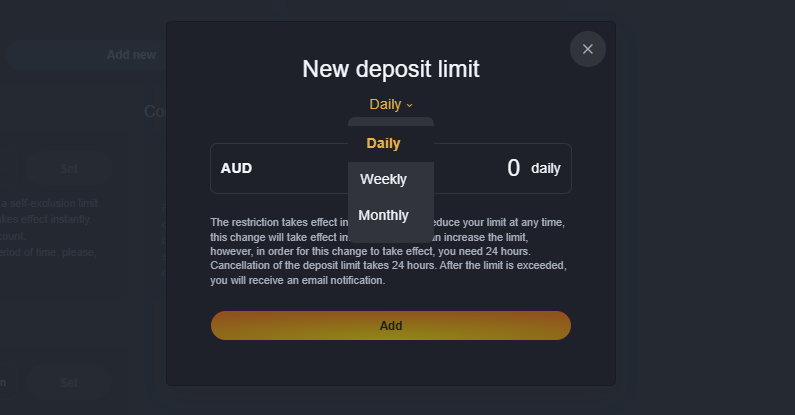
The deposit limit is one of the simplest responsible gambling tools, and most commonly available at online casinos. It lets you cap how much money you can add to your balance during a set period. Casinos most commonly offer daily, weekly, or monthly limits, while some sites also provide custom periods or amounts.
For example, if you set a weekly limit of A$200 and have deposited A$150, you can deposit only A$50 more until your limit resets. If you reach the maximum before the week ends, deposits should be blocked until the next week starts.
Also, pay attention to how the casino defines its periods, as ‘weekly’ doesn’t always mean Monday to Sunday. Also, check whether the limit resets automatically or if you have to reset it manually for each period, and how the casino combines daily and weekly limits.
Keep in mind that the deposit limit applies to all subsequent deposits after you activate it, and it doesn’t affect money already in your casino balance.
How to Set Up a Deposit Limit

The screenshot above shows an active daily deposit limit I set at an online casino I play at. This is how the deposit limit setting process goes step by step:
1
Log in to your casino account.
2
Go to My Account, Account Settings, or a similar menu.
3
Find Responsible Gambling or Gambling Limits.
4
Locate the Deposit limit, then click Add or Activate.
5
Choose your preferred period, usually from Daily, Weekly, or Monthly.
6
Enter the maximum amount you want to deposit in that period.
7
Confirm your limit, then refresh the page to verify it’s active.
Loss Limit
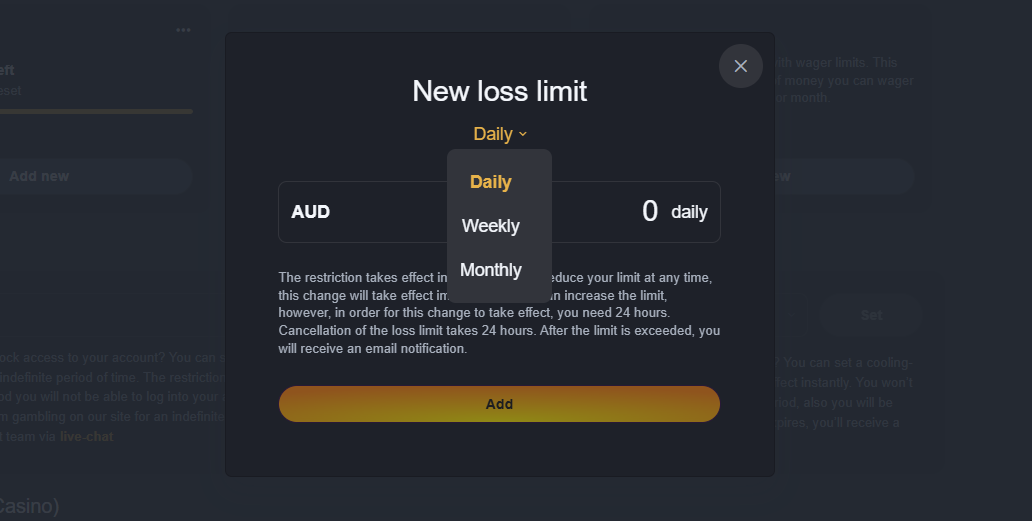
As its name explains, a loss limit caps how much you can afford to lose while gambling during a specific period. Again, depending on the casino, you may be able to choose a daily, weekly, or monthly limit, but remember that the available options and how losses are calculated can differ between casino sites.
You may be confused: how can I control how much I lose? An example helps. Say you set a daily loss limit of A$100. Then, you deposit A$200 and win A$150, bringing your balance to A$350.
You then continue playing and lose A$200, leaving you with A$150. This way, your net loss is A$50, so you still haven’t reached the A$100 loss limit. If you continue playing and then lose another A$50, your net loss reaches A$100, and the limit kicks in.
Once you reach this limit, the casino may restrict further gambling or deposits until the relevant period resets, depending on how its system works.
Note from Barbara: It’s very important to understand how the casino calculates your net losses, so always check the explanation provided when setting the limit.
How to Set Up a Loss Limit
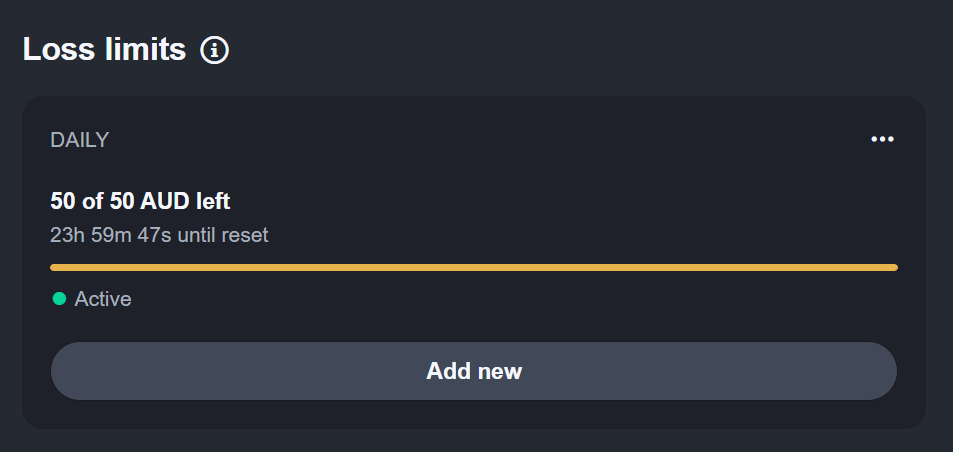
Setting up a loss limit is almost identical to setting up a deposit limit; the difference is that it applies to a different aspect of real money gambling.
This is how to activate a loss limit at your preferred casino site:
1
Sign in to your casino account.
2
Go to My Account, Account Settings, or a similar section.
3
Access the Responsible Gambling section, sometimes named differently, like Gambling Limits.
4
Locate the loss limit button.
5
Choose the available period, such as daily, weekly, or monthly.
6
Enter the maximum amount you are comfortable losing in the given period.
7
Check how the casino calculates losses and when the limit resets.
8
Confirm the cap if necessary.
Session Limit

The Session Limit tool helps players control how long their gambling sessions last. Instead of limiting your deposits or losses like the previous tools, you now limit the maximum time you stay logged in and play before the casino kicks you out of further play. Most casinos let you choose a session length, such as 30 minutes, 1 hour, or 2 hours.
A session limit is especially handy for players who tend to lose track of time. In the heat of the moment, a session can feel much shorter than it actually is, especially if you are used to jumping from online pokies to table games, or another casino game.
Once you reach the session limit, the casino might automatically end your session, block further play or ask you to take a break. The exact measures differ between operators, so read the details on how this works and what happens after you reach the session limit.
How to Set Up a Session Limit
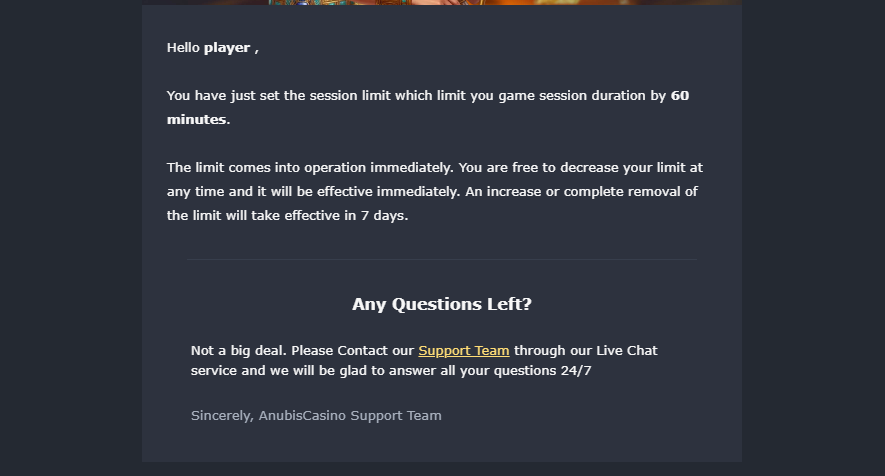
Setting up a session limit is just as simple as activating the previous caps and requires the following steps:
1
Log in to your online casino account.
2
Go to My Account, Account Settings, or a similar menu.
3
Find Responsible Gambling or Gambling Limits.
4
Locate the Session limit.
5
Check whether it is expressed in minutes or hours and enter the number.
6
Make sure to understand what happens after the session timer is reached.
7
Sometimes you’ll receive an email confirmation that a limit is active, as shown in my example from Anubis Casino in the screenshot above.
Wager Limit
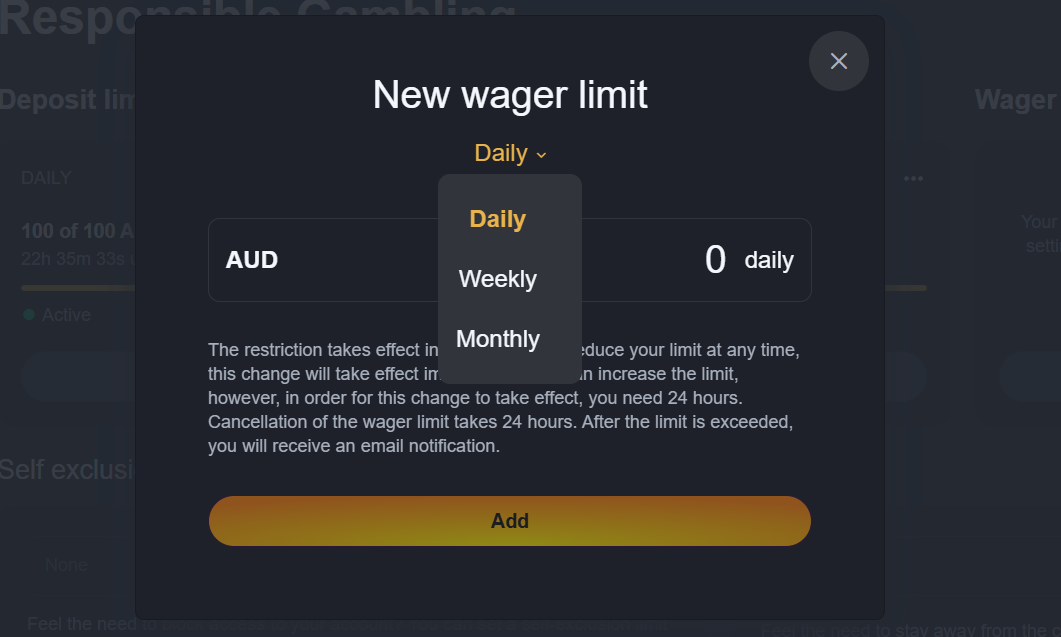
The Wager Limit is quite specific, but it doesn’t have to do with the money you deposit at a casino; instead, it limits the maximum amount you can stake on games during a period you define. It doesn’t depend on whether you win or lose those wagers. Again, you can usually choose among daily, weekly, or monthly limits.
Here’s an example: if you set an A$300 wager limit for one week, you can place bets that total up to A$300 during that week. You can wager A$100 three times or make smaller bets multiple times, up to you, but once you reach this limit, further wagers should be blocked.
Players who make lots of small bets that don’t feel significant but eventually add up can benefit from setting this limit over time. It also gives you another way to control your overall gambling activity even when you are winning, and your balance is getting bigger.
How to Set Up a Wager Limit

In order to limit the amount of money you bet on casino games during a given time frame, like a day, a week or a month, follow these steps:
1
Sign in to your casino account.
2
Go to My Account, Account Settings, or a similar section.
3
Access the Responsible Gambling section, sometimes named Gambling limits or similar.
4
Find the Wager limit button among the other tools.
5
Choose the available period, usually daily, weekly, or monthly.
6
Enter the maximum amount you want to wager in that period.
7
Confirm the limit if necessary.
Reality Check
The reality check as an RSG tool isn’t as common as the others I mentioned above, but it’s still useful if you want to avoid losing track of time.
It serves as a reminder or a ‘nudge’ that pops up while you are playing to notify you of the time you have spent on the site since you set the reminder. For example, you can set a reminder to pop up every 20, 60, or 120 minutes.
This RSG tool isn’t that restrictive, since it doesn’t ‘stop’ you from playing, like when you hit a limit and can’t play again until the timer restarts. It’s simply a prompt to pause, take a breath and then decide whether you want to continue.
It goes without saying that you should turn on the reality check before you start playing, especially if your time tends to ‘disappear’ while playing online casino games.
How to Activate Reality Check
To activate the reality check and take breaks at the casino you are playing, follow these steps:
1
Sign in to your casino account.
2
Go to the Account Settings or My Account, whatever it’s called.
3
Find the RSG tab, sometimes called Safe Gambling or Gambling Limits
4
Search for Reality Check among the available tools.
5
Choose how often you want to receive the reminder and enter a number.
6
Confirm and activate the setting.
Cool-Off Period
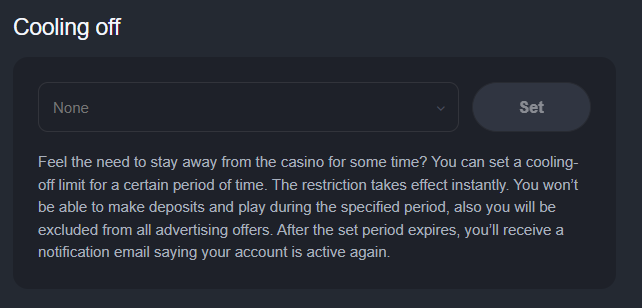
The cool-off, sometimes called a time-out, lets you take a temporary break from casino gambling and restricts access to your casino account for a set amount of time.
The cool-off length depends on the periods the casino allows and can range from a short break to several weeks or even months. For example, at the last casino I played, the options ranged from 1 day to 6 months.
This responsible gambling tool is helpful if you feel like you need a longer break but don’t want to lose access permanently. For example, activating the time-out is a good idea when you’ve had a long session, a string of unlucky sessions or simply when you notice that you are gambling more often than you intended.
Different casinos apply different restrictions when cool-off is activated; some sites may not let you access your account at all, while others block only deposits. Check which rules apply to avoid confusion.
Tip from Barbara: If you turn on cool-off because you feel you can’t control your gambling, consider taking a more serious approach like self-exclusion instead, since a short break may not provide enough of a barrier.
How to Activate a Cool-Off
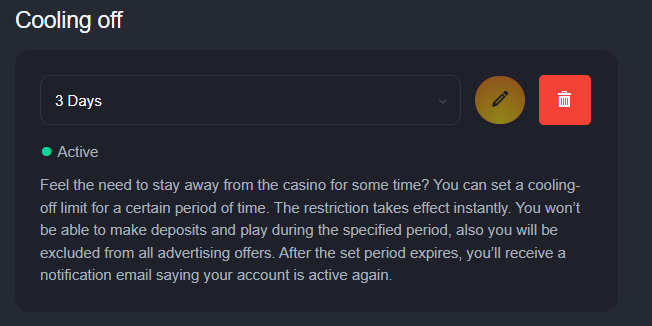
At some casinos, you’ll need to contact support to activate the cool-off period, but it’s often available under the same menu as the other limits. To turn on the time-out and take a longer break from gambling, follow these steps:
1
Log in to your online casino account.
2
Go to My Account, Account Settings, or a similar menu.
3
Find Responsible Gambling or Gambling Limits.
4
Find Cool-off or Time-Out, the usual names for this RSG tool.
5
Choose how long you want the break to last.
6
Review the restrictions that apply once activated.
7
Confirm the limit.
Self Exclusion
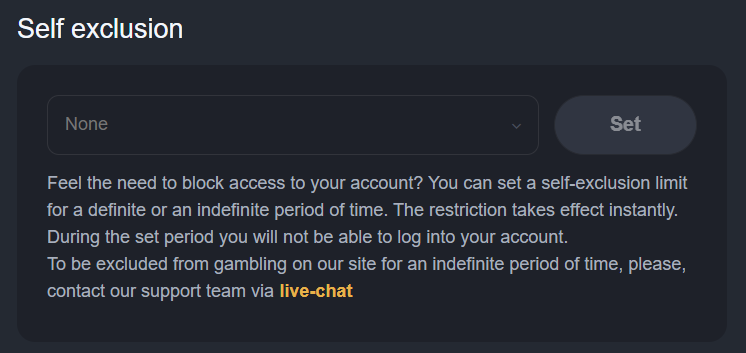
Self-exclusion is the strongest responsible gambling measure designed to prevent you from gambling for a longer period.
When you self-exclude, the casino should restrict your access to gambling services altogether until the time you selected expires. Exclusion periods vary; casinos may offer self-exclusion for several months, a year, indefinitely, or permanently.
Since this is the most serious RSG tool available at online casinos, some sites require you to contact support to activate it, while others offer it alongside other limits.
It’s best for players who find shorter limits don’t work for them, or who have repeatedly increased limits, chased losses, or generally found it hard to stick to the boundaries they’ve set.
Note from Barbara: Check what is restricted during your self-exclusion period; some casinos apply restrictions only to the particular site, while others apply them to brands within the same group. Also, check what happens to any remaining balance or to any pending withdrawals.
How to Activate Self-Exclusion
You can usually activate self-exclusion by contacting support via email or live chat if you want it for an indefinite period. But if it’s in the RSG section under your account, these are the steps you need to take:
1
Sign in to your casino account.
2
Go to the Account Settings or My Account.
3
Find the RSG tab, sometimes called Safe Gambling or Gambling Limits
4
Search for Self-Exclusion among the available tools.
5
Choose from the available time periods.
6
Confirm the exclusion.
Who are RSG Tools For?
Players can adjust the limits they’ve set, of course, but online casino sites treat lowering and increasing limits differently.
So, if you decide to tighten a limit, the change will take effect instantly. For example, if you reduce your weekly deposit limit from A$200 to A$100, the new restriction applies straight away.
Increasing a limit, however, involves more steps. So, if you have a daily limit of A$100 and decide to increase it to A$200, you will have to wait for it to take effect. Many casinos require you to confirm the change by email, then impose a 24-hour waiting period before the new limit takes effect.
This buffer period is intentional and prevents players from acting on impulsive decisions. Many might increase their limit after losing money and want another chance to win it back, which defeats the purpose of the limit you set. Waiting gives you time to reconsider instead of deciding at the peak of your emotions.
Adjusting the Limits – How to Do It
Players can adjust the limits they’ve set, of course, but online casino sites treat lowering and increasing limits differently.
So, if you decide to tighten a limit, the change will take effect instantly. For example, if you reduce your weekly deposit limit from A$200 to A$100, the new restriction applies straight away.
Increasing a limit, however, involves more steps. So, if you have a daily limit of A$100 and decide to increase it to A$200, you will have to wait for it to take effect. Many casinos require you to confirm the change by email, then impose a 24-hour waiting period before the new limit takes effect.
This buffer period is intentional and prevents players from acting on impulsive decisions. Many might increase their limit after losing money and want another chance to win it back, which defeats the purpose of the limit you set. Waiting gives you time to reconsider instead of deciding at the peak of your emotions.
What to Do if You Reach Your Limit
We talked about how to set them, but what happens if you reach a limit, and more importantly, what should you do?
Reaching a deposit, loss, or wager limit isn’t a sign to find your way around it. It’s the moment to let the limit do its job. It’s simple: stop depositing, wagering, or playing, and wait for the restriction to reset.
If you reach your limits more often than not, it may be time to reassess your gambling habits; you could lower your limits even further, activate a cool-off, or consider self-exclusion if you want a stronger restriction.
Outside organisations can also help you control your gambling. BetStop is the national self-exclusion program that forbids access to all Australian-licensed online casino sites and phone betting services. But remember, BetStop only works with domestically licensed operators, not international sites.
If gambling turns into a bigger problem, you can also contact the National Gambling Helpline on 1800 858 858, which provides free, anonymous support 24/7.
Latest Articles


Gambling is intended only for adults aged 18 and over. AustralianStakes.com is committed to producing fair, independent content, and our editorial opinions are not shaped by casino operators, advertisers, or other outside parties.
Gambling should always be treated as entertainment and contained within sensible limits. Anyone concerned about their own gambling habits or those of a friend or family member can access confidential support through the following organisations:
- https://responsiblewagering.com.au/
- https://www.gamblinghelponline.org.au/
- https://gamblershelp.com.au/get-help/